Recently, the long-missed Oracle BI SampleApp (V 406) instances that are hosted by Oracle have resurfaced.
While it is not sure how long they remain online, seize the opportunity and explore this first-class example environment. Here are the URLs:
http://slc02ojw.oracle.com:7780/analytics
As usual, username is prodney and password is Admin123.
Remember that the best available instance of the Oracle BI Sample App is the one you have on your own machine. Especially when you want to go beyond the browser.
have a nice day
@lex
Thursday, November 20, 2014
Monday, November 17, 2014
Siebel Innovation Pack 2014 is Available (Updated)
"Aurora has landed"
After many preliminary announcements and blog posts, Siebel Innovation Pack 2014 has been made available by Oracle.
You can find the installers as usual on edelivery.oracle.com.
Make sure that you also get the latest bookshelf and visit My Oracle Support frequently, watching out for patchsets and news.
The IP 2014 version of the Siebel Open UI Deployment Guide is already available as well.
Important Update: Please be aware that Patchset 1 for Innovation Pack 2014 is highly recommended for production use. Patchset 1 will be made available on My Oracle Support in due time (official GA). In the meantime, you can benefit from using the installers for evaluation and upgrade preparations and of course peruse the new documentation to learn about new features.
To celebrate this new release, we will discuss the major new features and enhancements here on Siebel Essentials with a series of articles over the following weeks.
Here is the list of articles we intend to provide in the near future:
have a nice day
@lex
After many preliminary announcements and blog posts, Siebel Innovation Pack 2014 has been made available by Oracle.
You can find the installers as usual on edelivery.oracle.com.
Make sure that you also get the latest bookshelf and visit My Oracle Support frequently, watching out for patchsets and news.
The IP 2014 version of the Siebel Open UI Deployment Guide is already available as well.
Important Update: Please be aware that Patchset 1 for Innovation Pack 2014 is highly recommended for production use. Patchset 1 will be made available on My Oracle Support in due time (official GA). In the meantime, you can benefit from using the installers for evaluation and upgrade preparations and of course peruse the new documentation to learn about new features.
To celebrate this new release, we will discuss the major new features and enhancements here on Siebel Essentials with a series of articles over the following weeks.
![]() |
| Isn't she pretty? |
- New Aurora theme (responsive web design)
- HI features that are now available in Open UI
- Going mobile with IP 2014
- Open UI API changes in IP 2014
- Custom themes by manifest
- (Oracle) Maps integration
- Order Management and Product Configurator in IP 2014
- The new communications panel
- HTML5 browser compatibility
have a nice day
@lex
Siebel CRM Patchset 13 for Innovation Pack 2013 is Available
Never missing a beat, the good people at Oracle have released Siebel CRM patchset 8.1.1.11.13 / 8.2.2.4.13 for Innovation Pack 2013 on My Oracle Support.
As usual, this is a cumulative patchset and contains numerous bug fixes for example in the Order Management and Open UI realms. If you are still using the High-Interactivity client, prepare for deployment of a new version of the Siebel Option Pack .cab files.
have a nice day
@lex
As usual, this is a cumulative patchset and contains numerous bug fixes for example in the Order Management and Open UI realms. If you are still using the High-Interactivity client, prepare for deployment of a new version of the Siebel Option Pack .cab files.
have a nice day
@lex
Thursday, November 13, 2014
Separating the Wheat from the Chaff: Seed Data vs. Customer Data in Siebel CRM
From time to time and for various reasons, we must be able to identify a record in a Siebel database as either belonging to the ever-growing set of Siebel seed data or as having been created by the customer.
Probably the easiest way to identify a record as seed data is to use the ROW_ID value. For example, let's go to the Product Administration view and run a query such as the following.
[Id] LIKE "0*"
The above search specification will retrieve all records that have a ROW_ID beginning with "0". The leading zero is a typical seed data indicator (and used in dataimp input files such as seed_locale.inp).
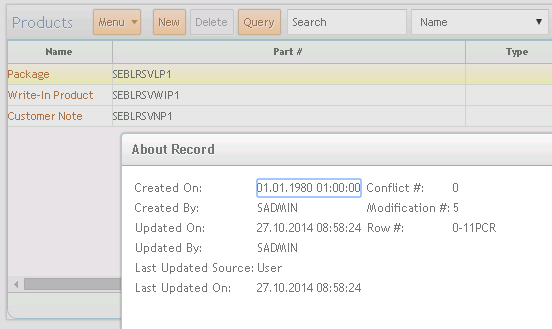
After typing/pasting the above in any text control and executing the query, we get a list of records that should be present in any Siebel database such as these three products.
Invoking the About Record command reveals that the active record is really ancient as most seed data records have a CREATED timestamp of January, 1st 1980.
Reversing the query of course retrieves only customer records: [Id] NOT LIKE "0*"
While the above works for almost every runtime data table, identifying custom records in repository tables is a bit trickier. For example, let's look at a typical Open UI Manifest record that is provided out-of-the box.
As we can see, the Manifest File record's ROW_ID does not start with zero. While it is quite special looking (two dashes for example) it might be difficult to distinguish from a customer record.
But at least for Open UI Manifest data, there's hope in form of a system field (not visible in the About Record dialog) which is named "Record Source". The column name is RECORD_SRC.
The pre and post default values of this field is "Customer", so now we have a solution for identifying Open UI Manifest data clearly as being created by a customer with the following search specification:
[Record Source] = "Customer"
Thanks to fellow Oraclean Barry for pointing this out. Seed records have a value of "Siebel Internal" in that column BTW.
have a nice day
@lex
Monday, November 10, 2014
Siebel CRM and URL Based Authentication
Remember this one?
http://myserver/callcenter_enu/start.swe?SWECmd=ExecuteLogin&SWEUserName=NotSADMINPlease&SWEPassword=yourpasswordincleartext
If you - for whatever reason - use URL-based authentication to load Siebel CRM application content in a browser or iframe then you should strongly consider reading Oracle Support Document 1496603.1 (Removing URL-Based Authentication in Siebel CRM).
In this document, Oracle recommends their customers to refrain from using the obviously insecure authentication via clear-text URL arguments (SWEUserName and SWEPassword). As a transitional solution, customers can add the EnableURLCredentials parameter to the eapps.cfg file (and set it to TRUE) to allow URL-based authentication.
However, Oracle plans to remove any support for URL-based authentication (and the aforementioned parameter) "following the release of Innovation Pack 2013".
So with IP 2014 around the corner, it's time to think about alternatives such as Single-Sign-On or Web Services Security.
Are you affected by this change? Please share your thoughts in the comments.
have a nice day
@lex
Thursday, November 6, 2014
Unsung Siebel Command Line Heroes: dataimp
After discussing the features and options of the elusive dataexp command line utility, we today talk about dataimp, which obviously serves in the reverse process of importing data from a flat file into Siebel tables.
Before we begin, let's reiterate the words of caution from our last article:
Neither dataexp nor dataimp are fully documented. Their obvious purpose is to serve in the Siebel installation and upgrade process as a flat-file data export and import facility. Please NEVER use them to replace valid Siebel integration solutions such as EIM or EAI.
Ok, you heard me, so now let's fire up dataimp to see what arguments it requires and provides.
Obviously, you will have to provide the following arguments to run a simple import:
/U Username
/P Password
/C ODBC Data Source
/D Table Owner
/F Path to .dat file to import
So the following is an example for a valid dataimp command line:
dataimp /U SADMIN /P SADMIN /C ouisandbox /D SIEBEL /F d:\test.dat
Note that 'ouisandbox' is the name of a custom ODBC data source for testing. In your environment, you will have to use a valid ODBC data source.
Running the above command will launch dataimp and it will (try to) import the data from the file into the respective table (the table names are in the .dat files produced by dataexp). "Try to" means that if records with the same user key already exist, the utility will throw an error, which is actually good and spares us a lot of trouble with duplicates.
Now let's look at the additional arguments we can use to control the behaviour of the 'imp' ;-)
Don't Import Everything
If you set the /E argument to N, you tell dataimp to prompt for table names. Then you can either provide a list of table names as an input file (using the /I argument) or manually enter them at the prompt. As a result, even if the .dat file contains a lot of tables, you can be more selective.
Delete Target Records Before Import
The /W argument - when set to Y - allows you to specify where clauses which will actually define which records to delete from the target table. With this option, you can clean up the table from records that you probably want to reload by the import.
It is also possible to provide the WHERE clause along with the table name in an input file (using the /I argument).
Another way of clearing the table is to set the /T argument to Y which will actually truncate the target table. You sure would run a few tests before doing that on a sensitive database, wouldn't you?
Specify Start Table and Start Row
The /S argument takes the name of a table. In case the .dat file contains data from more than one table you can direct dataimp to skip the other tables in favor of the one you specify with /S.
The /R argument takes an integer and defines the start row at which the import will start, basically skipping the rows before the start row.
Handle Errors
Using the /H argument you can define how dataimp handles errors. The following settings are available:
Transactions Anyone?
The /X argument allows you to specify the transaction unit as (R)ows, (T)able or (F)ile. When you use (R)ow level transactions, the /N argument allows you to specify the number of rows after which the utility commits the transactions to the database.
DB System Columns
There are two arguments that deal with the DB system columns in the target database. These DB system columns display the DB_LAST_UPD timestamp (when the record was last updated in the source DB) and the DB_LAST_UPD_SRC (a key to identify the source system).
The /K argument - when set to Y - uses the value of DB_LAST_UPD as provided in the source file. When set to N, the current timestamp will be used.
The /J argument (default: dataimp) allows to specify a string that will be used to populate the DB_LAST_UPD_SRC column, so you can tag the records.
Miscellaneous
There are other arguments that we could discuss but those mainly deal with DB2 oddities and seem to be very internal.
Summary
The dataimp utility proves powerful for pumping data from a file produced with dataexp into database table. Again, please heed to the words of caution and DO NOT use this as a replacement for real EIM or EAI.
Do you want to share your experiences with dataexp and dataimp? Please find the comments.
have a nice day
@lex
Before we begin, let's reiterate the words of caution from our last article:
Neither dataexp nor dataimp are fully documented. Their obvious purpose is to serve in the Siebel installation and upgrade process as a flat-file data export and import facility. Please NEVER use them to replace valid Siebel integration solutions such as EIM or EAI.
Ok, you heard me, so now let's fire up dataimp to see what arguments it requires and provides.
Obviously, you will have to provide the following arguments to run a simple import:
/U Username
/P Password
/C ODBC Data Source
/D Table Owner
/F Path to .dat file to import
So the following is an example for a valid dataimp command line:
dataimp /U SADMIN /P SADMIN /C ouisandbox /D SIEBEL /F d:\test.dat
Note that 'ouisandbox' is the name of a custom ODBC data source for testing. In your environment, you will have to use a valid ODBC data source.
Running the above command will launch dataimp and it will (try to) import the data from the file into the respective table (the table names are in the .dat files produced by dataexp). "Try to" means that if records with the same user key already exist, the utility will throw an error, which is actually good and spares us a lot of trouble with duplicates.
Now let's look at the additional arguments we can use to control the behaviour of the 'imp' ;-)
Don't Import Everything
If you set the /E argument to N, you tell dataimp to prompt for table names. Then you can either provide a list of table names as an input file (using the /I argument) or manually enter them at the prompt. As a result, even if the .dat file contains a lot of tables, you can be more selective.
Delete Target Records Before Import
The /W argument - when set to Y - allows you to specify where clauses which will actually define which records to delete from the target table. With this option, you can clean up the table from records that you probably want to reload by the import.
It is also possible to provide the WHERE clause along with the table name in an input file (using the /I argument).
Another way of clearing the table is to set the /T argument to Y which will actually truncate the target table. You sure would run a few tests before doing that on a sensitive database, wouldn't you?
Specify Start Table and Start Row
The /S argument takes the name of a table. In case the .dat file contains data from more than one table you can direct dataimp to skip the other tables in favor of the one you specify with /S.
The /R argument takes an integer and defines the start row at which the import will start, basically skipping the rows before the start row.
Handle Errors
Using the /H argument you can define how dataimp handles errors. The following settings are available:
- Abort (default): Stop processing when an error occurs
- Count: Continue after an error and display a summary at the end
- Watch: Continue after an error and display the whole process on the console
- Log: Continue after an error, display on console and write to log.
Transactions Anyone?
The /X argument allows you to specify the transaction unit as (R)ows, (T)able or (F)ile. When you use (R)ow level transactions, the /N argument allows you to specify the number of rows after which the utility commits the transactions to the database.
DB System Columns
There are two arguments that deal with the DB system columns in the target database. These DB system columns display the DB_LAST_UPD timestamp (when the record was last updated in the source DB) and the DB_LAST_UPD_SRC (a key to identify the source system).
The /K argument - when set to Y - uses the value of DB_LAST_UPD as provided in the source file. When set to N, the current timestamp will be used.
The /J argument (default: dataimp) allows to specify a string that will be used to populate the DB_LAST_UPD_SRC column, so you can tag the records.
Miscellaneous
There are other arguments that we could discuss but those mainly deal with DB2 oddities and seem to be very internal.
Summary
The dataimp utility proves powerful for pumping data from a file produced with dataexp into database table. Again, please heed to the words of caution and DO NOT use this as a replacement for real EIM or EAI.
Do you want to share your experiences with dataexp and dataimp? Please find the comments.
have a nice day
@lex
Monday, November 3, 2014
Siebel Open UI Code Template Generator
Sometimes I am overwhelmed by feeling totally privileged of working with so many brilliant people. Last week, fellow book author and Oraclean Duncan Ford published the Siebel Open UI Code Template Generator.
I am sure the Siebel Open UI community will be more than grateful for this JSFiddle project as it allows you to quickly pull a template for any type of Presentation Model or Physical Renderer. This way you can get started quickly and without the hassle of keeping static files.
The generator is easy to use, let's have a quick walk-through.
For demo purposes, we choose a UI object, let's say the Service Request Detail Applet. So for this demo, we have to register the new file as a physical renderer for this applet in the Manifest Administration view.
After logging off and on again, we can navigate to a view that contains the test applet and verify that the JavaScript console displays the log messages.
Voil?, a fully functional custom physical renderer in a few minutes. Now you can start implementing your custom code, which will probably take a bit longer ;-)
Thanks again to Duncan for this great contribution to the Siebel Open UI community.
Here is the link again: Siebel Open UI Code Template Generator
have a nice day
@lex
I am sure the Siebel Open UI community will be more than grateful for this JSFiddle project as it allows you to quickly pull a template for any type of Presentation Model or Physical Renderer. This way you can get started quickly and without the hassle of keeping static files.
The generator is easy to use, let's have a quick walk-through.
- First, you select the type of template (PM or PR) and the type of object (for example for a desktop form applet).
- Next, enter a name for your new class and decide whether you want comments and/or basic logging.
- Now simply copy the code and paste it into a new file in an editor of your choice.
- Save the file, using the same name as of the class (suffixed with 'PM' or 'PR'), to the siebel/custom folder in your developer web client.
For demo purposes, we choose a UI object, let's say the Service Request Detail Applet. So for this demo, we have to register the new file as a physical renderer for this applet in the Manifest Administration view.
After logging off and on again, we can navigate to a view that contains the test applet and verify that the JavaScript console displays the log messages.
Voil?, a fully functional custom physical renderer in a few minutes. Now you can start implementing your custom code, which will probably take a bit longer ;-)
Thanks again to Duncan for this great contribution to the Siebel Open UI community.
Here is the link again: Siebel Open UI Code Template Generator
have a nice day
@lex
Subscribe to:
Posts (Atom)